Geometry Dash Lite 3D


How to play
Controls in Geometry Dash Lite 3D are simple with a single button.
- On a computer, you press the spacebar or use the left mouse button to make the block jump.
- On a phone or tablet, you tap the screen to do so.
Special features of Geometry Dash Lite 3D
Simpler graphics
Unlike Geometry Dash 3D, Geometry Dash Lite 3D has lighter graphics, resulting in faster and smoother loading speeds. Obstacles are designed minimally, with simpler layouts and softer colors, making them easier for players to observe.
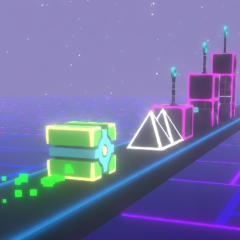
They are placed on the same path at the bottom of the tunnel, not added to the ceiling of the tunnel as in other versions. However, this does not reduce the difficulty or appeal of the game.
Longer tunnels
Levels in Geometry Dash 3D are constantly being updated. However, each level is designed to be quite long, making it much more challenging for players.
The tunnels in the game are three to four times longer than in other versions, helping players develop patience and resilience as they overcome the challenges.
Geometry Dash Meltdown 3D, Geometry Dash Breeze 3D, and Geometry Arrow 3D are also designed with 3D graphics, but each game has a unique gameplay mechanism. Try them all and experience them for yourself!